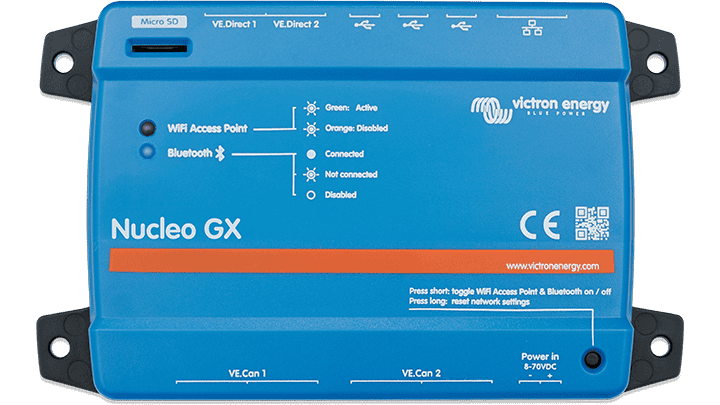
Victron Nucleo GX
Victron Nucleo GX The Nucleo GX is a compact GX device with the computing power of the Ekrano GX, but with a more focused set of connections and therefore a lower price. The device runs Venus OS, connects up to 25 devices via VE.Direct and USB and more via VE.Can, and provides real-time monitoring of battery status, consumption, and PV, generator, or grid power. Operation is via the Remote Console on the VRM portal, the VictronConnect app, or a web browser. Applications Not every installation requires relays, tank inlets, or VE.Bus. If your system is on VE.Can — think of a Multi RS with Lynx Smart BMS — then with a Cerbo GX you are paying for hardware that is idle. In that case, the Nucleo GX delivers the same speed as the Ekrano GX in a more compact device and scales with it via USB accessories if desired. * ESS and off-grid installations around the Multi RS and other VE.Can equipment * Systems managed remotely via VRM, without a local display * Large installations with many connected components or Node-RED automation * Control cabinets where compact installation matters Fast quad-core processor The quad-core processor delivers the same system response as the Ekrano GX. This is noticeable in large installations, with many integrations, and in Node-RED applications. Up to 25 devices via VE.Direct and USB combined; more can be added via VE.Can. Connections * 2x VE.Direct, always isolated * VE.Can 1 isolated and VE.Can 2 non-isolated * Ethernet, WiFi with access point, and Bluetooth Smart * 3x USB-A host, combined maximum 1.5 A at 5 V * MicroSD card slot, SDHC up to 32 GB * Buzzer, network reset button, and two status LEDs No built-in I/O — intentional The Nucleo GX has no VE.Bus port, no relays, no tank or temperature inputs, and no digital inputs. Where those functions are needed, you can expand with USB accessories: the MK3 USB interface for VE.Bus, the GX I/O Extender 150 for digital I/O and relays, or the GX Tank 140 for tank measurement. If you require all of those functions, a Cerbo GX or Ekrano GX is usually the simpler and more affordable choice. Operation and Display There is no HDMI port, so a GX Touch screen cannot be connected. For local display and operation, use an Android GX WiFi Display. Furthermore, everything is managed via the Remote Console on the VRM, over the local network, via the built-in WiFi access point, via VictronConnect, or via a web browser. Venus OS Functionality * Real-time overview of battery status, consumption, PV, generator, and grid power * Automatic generator start and stop with silent periods * DVCC with shared voltage, temperature, and current measurement * Integration with supported third-party lithium batteries * Marine MFD integration, NMEA 2000, and RV-C * Modbus-TCP, MQTT, and Node-RED via Venus OS Large * Data logging to VRM and remote firmware updates Power Supply and Mounting Power is supplied exclusively via the Power in V+ connection, 8 to 70 VDC; power via Ethernet or USB is not possible. The supplied DC power cable contains a slow-reacting 3.15 A fuse. Above 60 VDC, the device is considered a flush-mounted product and the installation must prevent contact with the terminals. Mount on a wall or, with the separately available DIN35 adapter small, on a 35 mm DIN rail. Preferably power the GX device directly from the battery and not from the AC output of an inverter/charger: in the event of a shutdown, monitoring and remote access will then also be lost. Documentation * Nucleo GX Manual (EN, HTML5) (https://www.victronenergy.com/media/pg/Nucleo_GX/en/index-en.html) * Nucleo GX Manual (EN, PDF) (https://www.victronenergy.com/upload/documents/Nucleo_GX/140558-Ekrano_GX__Venus_GX__Cerbo_GX__Cerbo-S_GX_Manual-pdf-en.pdf) * Nucleo GX Datasheet (EN, PDF) (https://www.victronenergy.com/upload/documents/Datasheet-Nucleo-GX-EN.pdf) * Dimensioning Drawing (PDF) (https://www.victronenergy.com/upload/documents/DimensionDrawing-Nucleo-GX-(BPP900453100).pdf) * 3D Dimensioning (PDF) (https://www.victronenergy.com/upload/documents/DimensionDrawing-Nucleo-GX-(BPP900453100)-3D.pdf) * 3D model (STEP) (https://www.victronenergy.com/upload/documents/DimensionDrawing-Nucleo-GX-(BPP900453100)-3D.STEP) * IEC 62368-1 Certificate (PDF) (https://www.victronenergy.com/upload/documents/Certificate-IEC-62368-1-Nucleo-GX.pdf) * ECE R10/7 Automotive Certificate (PDF) (https://www.victronenergy.com/upload/documents/Certificate-Automotive-ECE-R10-7-Nucleo-GX.pdf) * Victron Energy ISO 9001 Certificate (PDF) (https://www.victronenergy.com/upload/documents/ISO9001-certificate-2024-EN.pdf) * Victron GX product range – Venus OS documentation (EN) (https://www.victronenergy.com/live/venus-os:start) Victron Energy does not yet publish Dutch-language documentation for this article; the manual, the datasheet, and the certificates are in English. Contact Are you unsure whether to choose the Nucleo GX, the Cerbo GX MK2, or the Ekrano GX? Our specialists would be happy to help you determine which connections your installation actually requires. Please contact us (https://www.top.systems/nl/contact/). Specifications Power supply voltage 8 – 70 VDC VE.Direct 2 ports, isolated (max. 25 VE.Direct devices total) VE.Can 1 Isolated VE.Can 2 Non-isolated Ethernet Yes WiFi 2.4 GHz (2.412 – 2.462 GHz), 88.1 mW, access point included Bluetooth Bluetooth Smart, 2.402 – 2.48 GHz, 5.2 mW USB 3x USB-A host, combined max. 1.5 A at 5 V Card slot MicroSD, SDHC up to 32 GB I/O No built-in analog, digital, or relay connections Display Android GX WiFi Display, VictronConnect, or web browser (no HDMI) Dimensions (hxwxd) 78 x 154 x 48 mm, without connectors and mounting material Mounting Wall or DIN rail 35 mm (DIN35 adapter small not included) Protection class IP20 Operating temperature -20 to +50 °C Buzzer Yes Safety IEC 62368-1 EMCEN 301489-1, EN 301489-17 Automotive ECE R10-6 Warranty 5 years We would be happy to provide you with more information about this product. Please contact us
contact join us.